PreInk – Tattoo design maker
- 3.5
- Rating
- 1.00M
- Installs
- Free
- Price
 Analysis by App-foxy
Designing a tattoo is one of those creative tasks where a rough idea can feel much clearer in your head than on paper. I wanted to see whether Ink AI could close that gap, not by pretending to replace a tattoo artist, but by turning a vague concept into something visual enough to discuss. After spending time with this Art & Design app, I found its most useful role is as an idea generator: it helps you explore direction, mood, lettering, and composition before you commit to ink.
That distinction matters. Ink AI is not a complete tattoo-planning service, and I would not treat an AI image as a final stencil or a guarantee that a design will age well on skin. Its value is earlier in the process, when you need several starting points and do not yet know exactly what you want. The strongest reason to use it is speed during the messy first stage of tattoo design.
Turning a tattoo idea into something you can actually judge
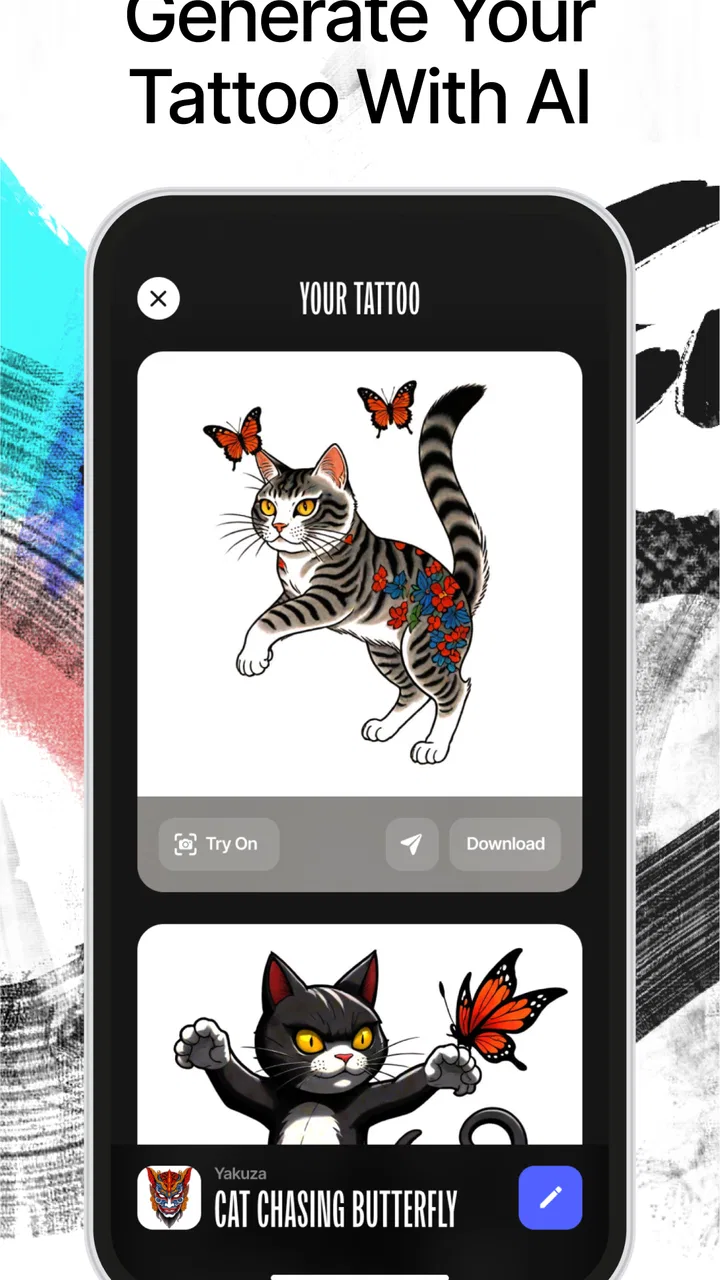
The central capability is straightforward: Ink AI creates tattoo concepts from an idea, then gives you visual material to react to. Instead of opening a blank drawing app and trying to construct an image from scratch, I can begin with a subject, a feeling, or a style direction and use the generated result as a conversation starter.
You May Also Like

 Blood Strike: 2.5 Anniversary
Blood Strike’s Loadouts Turn Every Drop Into a Tactical Gamble
A close look at Blood Strike’s custom loadouts: how fast access to signature weapons reshapes its battle royale rhythm, rewards preparation, and narrows the gap between fights.

 Pandora - Music & Podcasts
Pandora’s Music Is Easy to Start, but Harder to Recover
Pandora’s strength is its low-effort path from a seed to a station. Its weak spot is how much confidence it asks you to place in connection, setup, and quiet recovery.

 8 Ball Pool
 Is Built on Rivalries, Rematches, and Routine
A close look at the rivalries, rematches, shared routines, and unanswered safety questions that turn a quick pool match into a persistent mobile community.

 Samsung Music
’s Quiet Strength Is Playing What You Already Own
Its reach comes less from spectacle than from dependable access to a personal library. That simplicity is both the app’s strongest retention engine and its ceiling.

 AccuWeather: Weather Radar
AccuWeather Review: A Quick, Clear Forecast for Everyday Decisions
For everyday plans, the best forecast is the one you can understand quickly. AccuWeather makes rain timing, radar, and local conditions easy to act on, with a few trade-offs.

 Hill Climb Racing
Why Hill Climb Racing Still Turns Crashes Into One More Run
A tiny car, a bumpy hill and one more upgrade: Hill Climb Racing keeps resurfacing because its simple chaos makes every near-miss feel personal.
More From Our News Desk



That sounds simple, but it changes the creative process. A person may say, “I want a small symbol connected to travel,” while still being unsure whether the final piece should feel delicate, bold, geometric, traditional, or handwritten. Seeing a few interpretations makes those choices easier to identify. I can reject the heavy version, notice that the fine-line version feels too empty, and then refine the idea with a clearer sense of purpose.
The app’s focus also makes it more approachable than a general image generator. Its purpose is tied to tattoo design, tattoo lettering, and stencil-oriented ideas, so I am not starting with a completely open canvas. That focus is helpful for a newcomer who wants inspiration without learning a full illustration program first.
Ink AI comes from RefaceEuropeUAB and is available as a free app for Android users. It is listed for Everyone, which makes it easy to try casually, although the subject matter is naturally more relevant to people old enough to be seriously considering body art. The current version is 1.3.10, and the app runs on Android 7.0 or later.
Its audience is already fairly broad: the app has passed one million installs, while its average sits at 3.6 from roughly fifteen thousand ratings. I read that combination as interest with some room for improvement rather than automatic proof that every result will be excellent. The rating suggests that expectations should stay realistic, especially if you are hoping for a polished, tattoo-ready drawing immediately.
What the generator is really good at
In my experience, the generator is most useful when I treat the first result as a sketch of a direction rather than a finished artwork. It can help answer questions such as whether a central object should dominate the composition, whether text should be prominent, or whether a concept looks better as a compact emblem than a detailed scene.
This is particularly useful for symbolic tattoos. If I want to combine a flower, an animal, a date, and a personal reference, the difficult part is often not drawing each object. The difficult part is deciding what deserves attention and what should remain subtle. An AI-generated concept can expose a bad balance quickly. If every element competes for space, I know the idea needs simplifying before I show it to an artist.
It is also handy for exploring visual tone. The same subject can feel calm, dramatic, playful, dark, ornamental, or minimal depending on the treatment. Ink AI gives me a way to compare those moods without repeatedly redrawing the entire concept. That is a practical advantage over a notebook when I am still deciding what kind of tattoo feels like me.
Lettering is another area where the app can be a useful starting point. A phrase may look appealing in ordinary text but lose its character when imagined as a tattoo. Trying different typographic directions can reveal whether the words should be the main feature, a small accent, or removed entirely. I would still ask a tattoo artist to check the lettering carefully, but the app helps me decide what style of conversation to have.
How I would use it in practice
I would begin with one idea at a time instead of packing every personal detail into the first request. For example, I might start with the subject and the emotional tone, then examine the result for its broad shape. Only after that would I think about placement, text, or secondary symbols. This staged approach produces more useful feedback than trying to describe an entire life story in one prompt.
A good workflow is to create a small set of contrasting directions. I might explore a clean emblem, a more decorative composition, and a bolder illustrative version. The goal is not to collect endless images. The goal is to identify the design language that feels right. Once I know that, I can take the strongest concept to a professional and ask for a version built for real skin.
One non-obvious benefit is that the app can help separate sentimental importance from visual importance. A symbol may mean everything to me but still work best as a small supporting detail. Conversely, an ordinary shape may be the thing that gives the tattoo its readable silhouette. Looking at the generated composition lets me make that distinction before I become emotionally attached to an overcrowded design.
I would save or show the concepts as references, not as instructions to copy blindly. A tattoo artist needs to consider line weight, body movement, skin texture, scale, and how the design may change over time. Those decisions are outside the safe role of an inspiration app. Ink AI is valuable because it gives the artist a better starting brief, not because it eliminates the artist’s judgment.
A realistic everyday scenario
Imagine I am planning a small tattoo to mark a long trip. I know I want a compass-like idea, but I do not know whether it should include a mountain outline, a subtle letter, or a decorative border. I open Ink AI during a quiet evening and test the main concept without committing to a design appointment yet.
The first useful discovery might be that the compass dominates every version and makes the other elements unreadable. I could then remove the border and ask for a simpler treatment. In another version, the mountain may become too detailed for a small tattoo, which tells me to keep only its outline. By the end, I may not have a final design, but I have a much clearer brief: a compact symbol, limited detail, and one understated personal reference.
That saves time in a way a generic gallery does not. Browsing existing tattoo photos can provide inspiration, but it often encourages copying a finished piece without understanding why it works. Ink AI is better for translating my own starting idea into alternatives. The trade-off is that the alternatives may need more correction and artistic discipline than a strong reference from an established tattoo portfolio.
Where it differs from ordinary design tools
Compared with a sketchbook, Ink AI is faster at producing visual variations, especially for people who do not draw confidently. Compared with a full illustration app, it is less demanding because I do not need to build every shape manually. Compared with browsing tattoo websites or social feeds, it is more personal because the concept begins with my prompt rather than someone else’s finished work.
Those advantages come with a clear limitation: I have less direct control over every line. In a drawing app, I can place an element exactly where I want it, adjust proportions, and edit individual marks. With AI-generated concepts, I may receive an attractive overall image that contains a detail I dislike or a structure that would be awkward to tattoo. That makes Ink AI a better companion for ideation than for precise final production.
It also should not be confused with professional stencil preparation. A stencil needs clean, deliberate shapes and practical decisions about scale and placement. An attractive screen image can contain details that disappear when reduced, lines that are too close together, or shading that does not translate well. I would always expect a tattoo artist to redraw and adapt the concept.
Lettering and stencil thinking require extra care
Text is one of the areas where I would slow down. AI-generated lettering can look convincing at a glance while still being unsuitable for permanent use. A single incorrect character, awkward connection, or overly decorative stroke can change the meaning or make the tattoo difficult to read.
My practical advice is to use generated lettering to compare mood and layout, then verify every character independently. If the phrase matters deeply, I would bring the exact wording to a tattoo artist and ask for custom lettering. Ink AI can help me decide whether I prefer a narrow script, a blockier appearance, or a restrained arrangement, but it should not be the final authority on spelling or legibility.
The same caution applies to stencil-style concepts. A design may look clean because the screen preview is small, yet become crowded when enlarged or placed on a curved body area. Before approving anything, I would ask how the image will read from a normal distance and how much open space it needs. The app can suggest a structure; it cannot feel the shape of my arm, shoulder, ribcage, or ankle.
The trade-offs behind the free download
Ink AI is free to download, which makes experimentation accessible. It also includes in-app purchases ranging from $3.99 to $42.99 per item. That pricing range means I would explore the free experience first and decide whether the workflow genuinely helps me before paying for anything. For a one-time tattoo idea, the value depends on how much the app improves my decision-making rather than how many images I can produce.
I would also keep an eye on how quickly experimentation becomes repetition. AI tools can encourage endless prompting: one more variation, one more style, one more combination. That can be useful at the beginning but counterproductive once I have a clear direction. My best approach would be to set a small goal, such as comparing three distinct moods, then stop and evaluate the concepts with practical questions about size, detail, and meaning.
The 3.6 average rating reinforces that this is not a flawless professional design suite. Some users will likely enjoy the speed and accessibility, while others may find the results inconsistent with their expectations. I think the app makes sense when the user understands that the output is exploratory. Someone expecting a perfect custom tattoo ready for immediate transfer may be disappointed.
Privacy and permanence also deserve common sense. I would avoid entering highly personal information that is not needed to describe the visual idea. A tattoo concept can be explained through symbols, shapes, and mood without writing an intimate biography. More importantly, I would never let an AI image rush me into a permanent decision. The app makes creation feel quick; the tattoo itself should still involve patience.
Who gets the most value from Ink AI
The best match is someone who has a general tattoo idea but struggles to visualize it. That includes first-time tattoo seekers, people comparing several styles, and users who want to arrive at a consultation with something more concrete than a verbal description. It is also useful for a friend group planning a shared symbol, because different people can react to visible variations instead of arguing about abstract adjectives.
It can help experienced tattoo clients too, particularly when they want to communicate a mood or composition to an artist. A generated concept may show that a supposedly small idea has too many parts, or that the chosen focal point is not the one the client wants. That kind of early correction can make a consultation more productive.
I would recommend skipping it if you already have a precise drawing and need exact vector editing, production-ready line work, or dependable lettering. A dedicated illustration tool or direct collaboration with a tattoo artist will be better in those cases. I would also skip it if I tend to confuse visual novelty with personal meaning. AI can produce an impressive image that does not feel right after the initial excitement fades.
For people who want a tattoo based on a portrait, a complex anatomical subject, or a highly specific cultural symbol, professional guidance is especially important. The app may help generate a broad direction, but accuracy and respectful interpretation matter more than convenience. I would use the result as a discussion aid and verify the concept with someone qualified before moving forward.
My practical recommendation before booking an appointment
After generating ideas, I would narrow them down using a short checklist. Does the design still make sense when viewed small? Is the main silhouette recognizable without the decorative details? Can the lettering be read easily? Would the concept still feel meaningful if the trend behind its style disappeared? These questions turn a visually exciting result into a more responsible shortlist.
I would then show the shortlist to a tattoo artist rather than asking for an exact copy. The artist can adapt the design to the chosen body area, remove fragile details, improve spacing, and explain what will remain readable over time. If the artist recommends major changes, I would take that as part of the process, not as a failure of the app.
It is also worth comparing the concept with ordinary references. Looking at a tattoo artist’s portfolio can reveal how their work handles skin, scale, and healed results. Ink AI is good at opening possibilities, while a professional portfolio is better at showing a consistent real-world standard. Using both gives me more balanced expectations than relying on either one alone.
In the end, I see Ink AI as a friendly sketch partner rather than a digital tattoo artist. Its focused approach makes the intimidating first step easier, and its strongest contribution is helping me discover what I actually mean when I describe a tattoo idea. The app is free to try, available to a wide range of Android devices, and simple enough for casual experimentation, but the paid options and uneven creative output mean I would judge its value carefully.
My recommendation is positive for brainstorming, not for final approval. If you are stuck between several concepts, need a visual aid for a consultation, or want to test lettering and composition before spending time with an artist, Ink AI can be genuinely useful. If you need exact control, flawless text, or a production-ready stencil, I would choose a professional workflow instead. Used with that boundary in mind, Ink AI earns its place as an early-stage tool for turning a personal idea into a conversation you can see.
FAQs for PreInk – Tattoo design maker
01What features does Ink AI offer for tattoo design?
Ink AI provides a range of features to assist in creating custom tattoo designs. Users can explore a vast library of design templates and elements, utilize AI-powered tools to generate personalized designs, and adjust colors and sizes. The app also allows for virtual try-ons, helping users visualize how the tattoo will look on their skin.
02Is Ink AI suitable for professional tattoo artists?
Yes, Ink AI is beneficial for both amateurs and professionals. Tattoo artists can use the app to brainstorm ideas, refine client requests, and access a diverse set of design tools. The app's AI capabilities can enhance creativity and streamline the design process, making it a valuable tool in a professional setting.
03Does Ink AI require an internet connection to function?
While some features of Ink AI may require an internet connection—such as downloading new design templates or accessing cloud storage—the core functionalities, like using the design tools and templates already on the device, can be used offline. This flexibility allows users to work on designs anytime, anywhere.
04How user-friendly is Ink AI for beginners?
Ink AI is designed to be user-friendly, with a clean interface and intuitive navigation. Beginners can easily start designing with guided tutorials and tips available within the app. The AI-powered suggestions also assist users in creating professional-looking designs without prior experience, making it accessible for everyone.
05Is there a cost associated with using Ink AI?
Ink AI offers both free and premium versions. The free version includes basic design tools and a limited selection of templates. For additional features, such as an expanded library of designs and advanced AI tools, users can opt for a subscription-based premium version. This tiered structure allows users to choose based on their needs and budget.
Pros
- Extensive design library for inspiration.
- User-friendly interface for easy navigation.
- Customizable templates for personalized designs.
- High-quality image exports available.
- Regular updates with new features.
Cons
- Limited free features; premium required.
- Occasional lag on older devices.
- Ads can be intrusive at times.
- Requires internet for full functionality.
- No direct social media sharing option.

PreInk – Tattoo design maker
Gallery